Callbacks
Callbacks are functions GSAP runs at fixed points in a tween or timeline's lifecycle: `onStart` when it begins, `onUpdate` on every frame it advances, `onComplete` when it finishes, and `onReverseComplete` when it finishes playing back to the start. They are how you sync non-animated work, a counter readout, a class toggle, an analytics ping, to the animation's real progress instead of guessing the timing with `setTimeout`.
Updated June 30, 2026
How callbacks fire
Every callback is just a function you pass in the vars object. GSAP calls it, scoped to the tween or timeline instance, at the moment named by the key. The core set is onStart, onUpdate, onComplete, onReverseComplete, onRepeat, and onInterrupt.
Pass a function REFERENCE, not a call. onComplete: myFn registers the function. onComplete: myFn() runs myFn immediately while GSAP builds the tween and stores its return value as the callback, which is the single most common reason a completion handler appears to fire right away.
onUpdate runs once per rendered frame, so up to 60 times a second. That makes it the place to read the tween's animating value and push it somewhere GSAP isn't touching directly, a text node, a canvas, a custom property. It also makes it the place jank starts if you do layout-reading or heavy DOM work in there.
onUpdate runs every frame
width, top, left) inside onUpdate forces the browser to recalculate layout on every frame. Non-composited, layout-thrashing animations already show up on 40% of mobile and 44% of desktop pages (Web Almanac 2025). Keep onUpdate work to transforms, textContent, or a CSS variable, and let the compositor handle the rest.To hand data into a callback, use onCompleteParams (an array of arguments) and callbackScope (what this resolves to inside the function). This avoids closing over stale variables when the same handler runs for many tweens.
Reach for a callback when
- You need to read the animating value mid-tween (
onUpdatedriving a counter's displayed number or a progress bar's label) - Work has to happen exactly when the motion ends (
onCompletesnapping a value to its exact target, togglingpointer-events, dispatching an event) - A reversed timeline needs to loop or reset (
onReverseCompletereseeding a seamless marquee's time) - You want to fire analytics or a sound on the rising edge of an animation (
onStart) - A repeating tween needs to do something each cycle (
onRepeat)
Use something else when
- You're chaining several animations one after another, use a timeline with the position parameter instead of stacking
onCompletehandlers that each start the next tween - You just want to
awaitthe end of one animation,tween.then()returns a promise, which reads cleaner than wrappingonCompleteyourself - The trigger is scroll position, use ScrollTrigger's own
onEnter/onLeave/onUpdatecallbacks, which carry the trigger's progress - You need a value continuously every frame regardless of any tween,
gsap.ticker.add()is the raw frame loop without an animation attached
Used in these Annnimate components
Callbacks are the bridge between GSAP's number-tweening and the DOM work GSAP doesn't do on its own. Three Annnimate components lean on different callbacks:
- The Counter tweens a plain object's
valueand writes it to the element inonUpdate, then inonCompletesnaps to the exact target and dispatches ananm-counter-completeevent so the rest of the page can react - The Progress indicator reads
self.progressinsideonUpdateto keep the bar bound to scroll position frame by frame - The Marquee loops seamlessly with
onReverseComplete: when the reversed timeline reaches the start it reseeds its own time so the scroll never visibly resets
See it running in production
 CounterA number that counts up as you scroll to it, either rolling like an odometer with each digit spinning on its own, or ticking up smoothly.
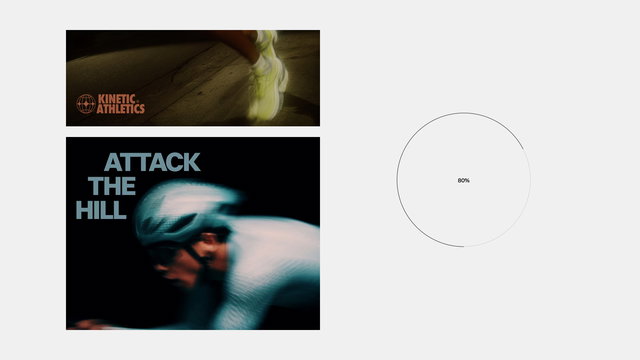 ProgressA little indicator that shows how far you've scrolled through a page, as a ring with a percent, a bar, or a plain counter.
 Infinite MarqueeA row of content that scrolls on its own, sideways or up and down, and you can grab it to scrub through and let go to keep it going.
Common questions
- How do I run code after a GSAP animation finishes?
- Pass an
onCompletefunction in the tween's vars:gsap.to('.box', { x: 100, onComplete: () => doThing() }). If you'd rather await it, every tween and timeline is thenable, soawait gsap.to('.box', { x: 100 })works too. UseonCompletewhen you want a fixed handler,.then()when you're sequencing in async code. - Why does my onComplete fire immediately instead of at the end?
- Almost always because you invoked the function instead of referencing it.
onComplete: myFn()runs myFn right now and hands GSAP whatever it returned. Drop the parentheses:onComplete: myFn. If you need to pass arguments, keep the reference and useonCompleteParams: [arg1, arg2]. - What's the difference between onComplete and onReverseComplete?
onCompletefires when the animation reaches its end playing forward.onReverseCompletefires when it reaches the START again after playing in reverse (viareverse()or a yoyo cycle returning to the beginning). A seamless loop, a close-then-reset drawer, or any 'we're back where we started' moment isonReverseCompleteterritory.- How do I pass arguments to a GSAP callback?
- Use the matching params array:
onCompleteParams,onStartParams,onUpdateParams, etc. You can also reference the tween itself inside the params with the special string'{self}', and setcallbackScopeto control whatthispoints to inside the function. This keeps a shared handler from closing over stale loop variables. - onUpdate vs gsap.ticker, which should I use for per-frame work?
onUpdateruns only while that specific tween is active and gives you its progress.gsap.ticker.add(fn)runs every frame for as long as it's attached, with no tween involved. UseonUpdateto react to an animation's value (a counter, a progress bar). Use the ticker for a standalone render loop, like a canvas or a physics step, that should run independent of any tween.
